> For the complete documentation index, see [llms.txt](https://knowledge-base.myappz.ai/home/llms.txt). Markdown versions of documentation pages are available by appending `.md` to page URLs; this page is available as [Markdown](https://knowledge-base.myappz.ai/home/lead-management/contact-groups.md).

# Contact Groups

You can create a group from here

**Step 1: Clicking on Groups.**

<div align="left"><figure><img src="https://2134630697-files.gitbook.io/~/files/v0/b/gitbook-x-prod.appspot.com/o/spaces%2FHH6BEHjheK80eLLkCLVd%2Fuploads%2F0L24PBfK2muAvsjO4KbO%2Fimage.png?alt=media&amp;token=faeff5b3-8d29-4797-86dd-f235f126b903" alt=""><figcaption></figcaption></figure></div>

**Step 2: Click on Create Group.**

<figure><img src="https://2134630697-files.gitbook.io/~/files/v0/b/gitbook-x-prod.appspot.com/o/spaces%2FHH6BEHjheK80eLLkCLVd%2Fuploads%2FpKrgFq5fKbiEUlbFs30P%2Fimage.png?alt=media&amp;token=056b23f2-0cba-4edd-b578-229a693b1abf" alt=""><figcaption></figcaption></figure>

#### Step 3: When you click on the Create Group button, a pop-up will open where you can type a group name and save it.&#x20;

<figure><img src="https://2134630697-files.gitbook.io/~/files/v0/b/gitbook-x-prod.appspot.com/o/spaces%2FHH6BEHjheK80eLLkCLVd%2Fuploads%2FeltKPB6A9xYjItpNmEXE%2Fimage.png?alt=media&amp;token=91ec8fae-c264-4e9f-9e0f-acb935565bc6" alt=""><figcaption></figcaption></figure>

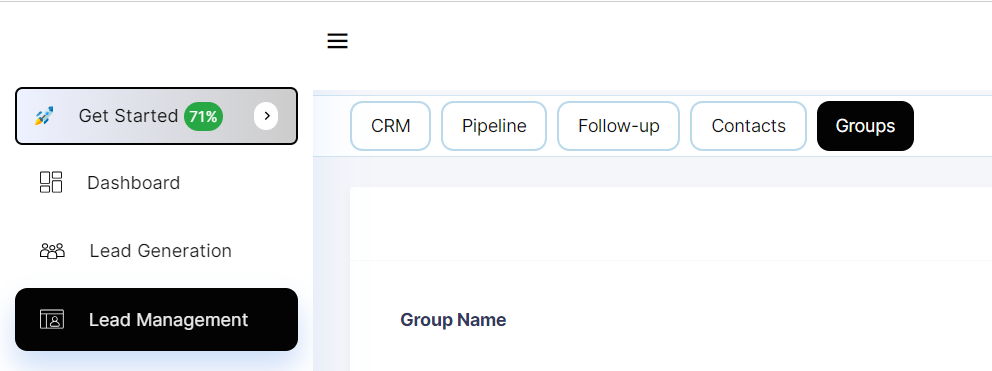
**Once you saved it shows group name in the table.**
<figure><img src="https://2134630697-files.gitbook.io/~/files/v0/b/gitbook-x-prod.appspot.com/o/spaces%2FHH6BEHjheK80eLLkCLVd%2Fuploads%2F70kYT5Xhm2TwaBhJrmus%2Fimage.png?alt=media&amp;token=17675552-093d-46f4-b3c8-88c1a54df614" alt=""><figcaption></figcaption></figure>
