> For the complete documentation index, see [llms.txt](https://knowledge-base.myappz.ai/home/llms.txt). Markdown versions of documentation pages are available by appending `.md` to page URLs; this page is available as [Markdown](https://knowledge-base.myappz.ai/home/lead-automation/email-templates/action-button-move-to-folder.md).

# Action button - Move to folder

**Step 1: Click on**  ![](https://2134630697-files.gitbook.io/~/files/v0/b/gitbook-x-prod.appspot.com/o/spaces%2FHH6BEHjheK80eLLkCLVd%2Fuploads%2F049GRv0Lo8bl5EzgqDRP%2Fimage.png?alt=media\&token=c532759b-9885-487b-a0b0-af984ee7c737)**in Action tab >> Click on Move to folder.**

<figure><img src="https://2134630697-files.gitbook.io/~/files/v0/b/gitbook-x-prod.appspot.com/o/spaces%2FHH6BEHjheK80eLLkCLVd%2Fuploads%2FirOB4pcsqsihiOBPt7kp%2Fimage.png?alt=media&amp;token=cbaa7d7b-bf94-4d9b-bdb8-06949ee3c642" alt=""><figcaption></figcaption></figure>

**Step 2 : Clicking on Move to Folder will open a pop-up where you can select a folder.**

<figure><img src="https://2134630697-files.gitbook.io/~/files/v0/b/gitbook-x-prod.appspot.com/o/spaces%2FHH6BEHjheK80eLLkCLVd%2Fuploads%2F6gcDArNZBTNPOueGTeJ6%2Fimage.png?alt=media&amp;token=89239399-c56e-4433-bc17-14503e6ebccd" alt=""><figcaption></figcaption></figure>

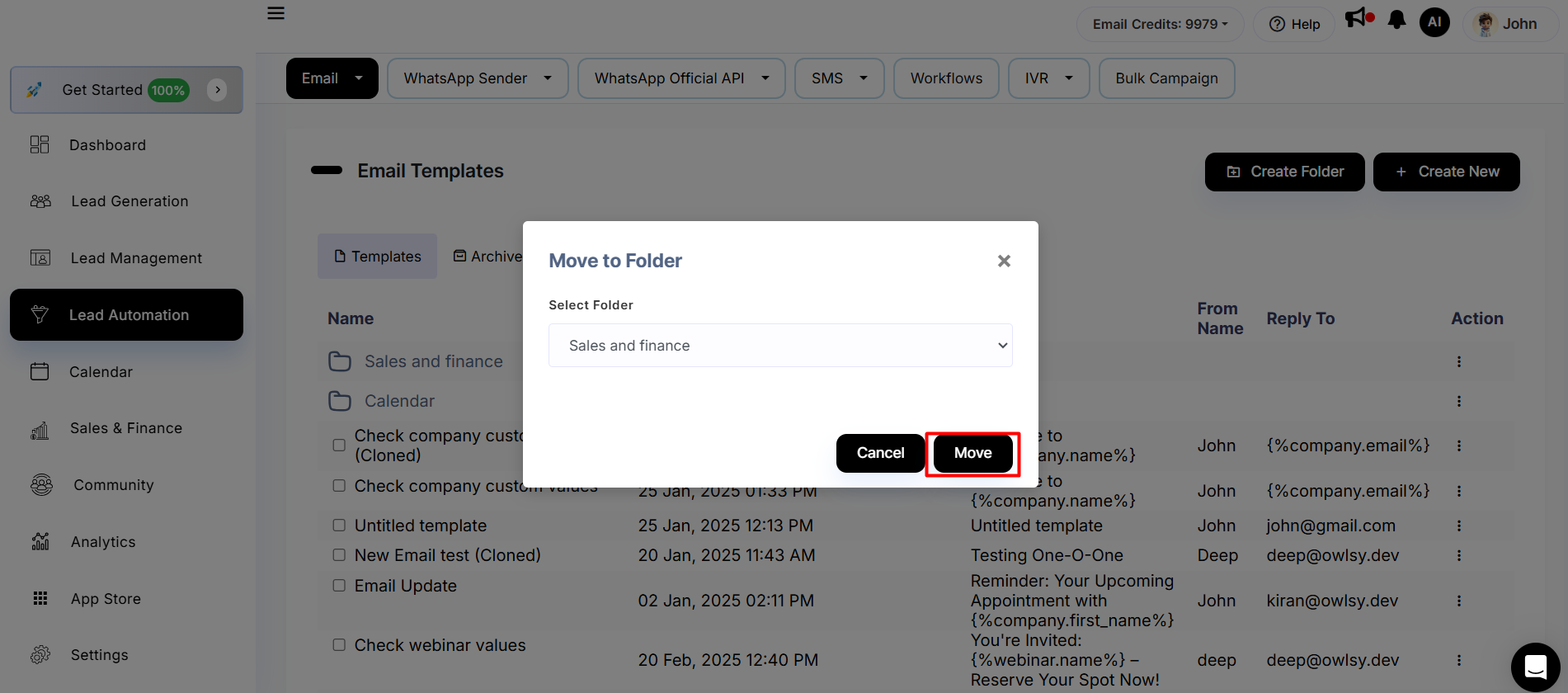
**Step 3 : Select the folder and click on the Move button.**

<figure><img src="https://2134630697-files.gitbook.io/~/files/v0/b/gitbook-x-prod.appspot.com/o/spaces%2FHH6BEHjheK80eLLkCLVd%2Fuploads%2F3aaK601tJ4MAwVoaVeOo%2Fimage.png?alt=media&amp;token=5069fd8d-1f4e-4f3d-b1be-53877ad09d80" alt=""><figcaption></figcaption></figure>

**You can see that template inside the folder.**

<figure><img src="https://2134630697-files.gitbook.io/~/files/v0/b/gitbook-x-prod.appspot.com/o/spaces%2FHH6BEHjheK80eLLkCLVd%2Fuploads%2FvVMUaWUH3Ylx1NlNpI21%2Fimage.png?alt=media&amp;token=e128e525-8107-4aa4-8f5a-eefcd8d0b268" alt=""><figcaption></figcaption></figure>